

If you run WordPress on your own VPS, Apache and NGINX can both serve the site well, but they make different trade-offs. NGINX is usually the better default for high concurrency, static-file delivery, and optional HTTP/3. Apache is easier when your WordPress stack depends on .htaccess or Apache-specific modules.
This Apache vs NGINX comparison focuses on the differences that matter for WordPress: architecture, PHP handling, configuration, HTTP/3, and whether running both is worth the extra complexity. LiteSpeed and Caddy are outside the scope.
Short answer: for a self-managed WordPress VPS, choose NGINX by default. Choose Apache if your site or plugins depend heavily on .htaccess. Run both only when you specifically need NGINX in front without giving up Apache compatibility.
What Is Apache?
Apache is a popular open-source web server software that is developed and maintained by the American nonprofit corporation Apache Software Foundation (ASF). It is also known as Apache HTTP Server and HTTPD.
Apache's download page lists 2.4.68, released in June 2026, as the current stable release.
Apache HTTP Server is a modular open-source server with mature support for per-directory .htaccess rules, multiple Multi-Processing Modules (MPMs), reverse proxying, URL rewriting, TLS, and dynamically loaded modules. For WordPress, its biggest practical advantage is configuration compatibility rather than raw speed.
The Apache features that matter most in this comparison are its prefork, worker, and event MPMs; .htaccess; HTTP/2; reverse proxying and load balancing; FastCGI support; dynamic modules; URL rewriting; and TLS.
What Is NGINX?
NGINX ("engine x") is an open-source web server, reverse proxy, content cache, load balancer, TCP/UDP proxy, and mail proxy originally written by Igor Sysoev. Its worker processes use an event-driven model designed to handle many concurrent connections with low per-connection overhead.
NGINX's download page lists the 1.30.x stable branch and the 1.31.x mainline branch.
Apache vs NGINX: Key Differences for WordPress
Apache and NGINX differ most clearly in how they handle connections, configuration, PHP, and protocol support. Apache's behavior depends heavily on the MPM it runs, while NGINX uses event-driven worker processes.
Apache vs NGINX: Architecture
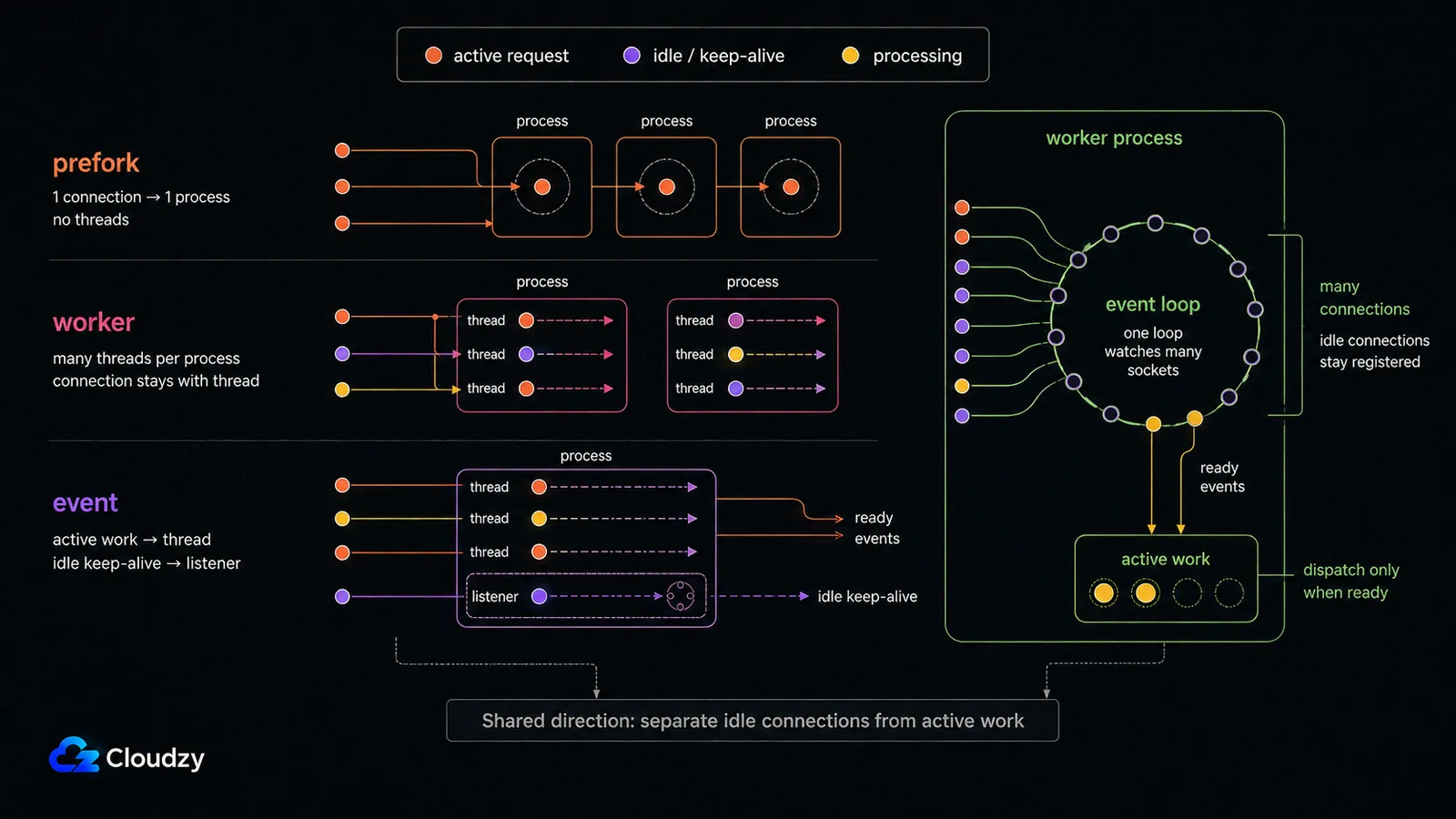
Apache's request model depends on the MPM you run. Prefork is process-based, while worker and event use threads. NGINX uses worker processes built around event loops. That makes the familiar "process-driven Apache vs event-driven NGINX" comparison too simplistic for a current Apache 2.4 setup.
Apache's event MPM can hand idle keep-alive connections to its listener thread rather than tying up a worker thread for each connection. NGINX still tends to have lower per-connection overhead under large numbers of concurrent connections, but the architecture gap is much narrower than old prefork-era comparisons suggest.
Apache vs NGINX: Performance
NGINX's main performance advantage appears under high concurrency and static-file workloads. Its event-driven workers can keep many connections open with relatively low per-connection overhead. Apache's event MPM narrows that gap considerably compared with older prefork configurations.
Dynamic WordPress requests are different. NGINX normally forwards PHP to FastCGI, commonly PHP-FPM. Apache can use PHP-FPM through FastCGI as well, or run PHP through an Apache module.
Once PHP starts executing WordPress, plugin code, database queries, object or page caching, and PHP worker sizing can matter more than the web server in front. If a plugin runs a dozen expensive database queries per request, switching from Apache to NGINX will not fix the underlying problem.
Apache vs NGINX: HTTP/3 and QUIC Support
HTTP/3 is the current version of the protocol, and it runs over QUIC instead of TCP. Whether your site can offer it at all depends on the web server sitting in front of it, and this is the one comparison point where the two servers are not close.
NGINX has shipped an HTTP/3 module since version 1.25.0. It is not built by default, and the build needs the --with-http_v3_module parameter.
NGINX's HTTP/3 module documentation still labels the module "experimental, caveat emptor applies."
Apache 2.4 ships no native HTTP/3 or QUIC module; its bundled protocol support stops at mod_http2.
The practical consequence for a site owner: a standard Apache 2.4 installation does not offer HTTP/3. For production use, the practical option is still to terminate HTTP/3 in an HTTP/3-capable reverse proxy or CDN in front of Apache. If you want the protocol, one option is to put NGINX in front of Apache and let NGINX terminate client connections, which is the arrangement covered further down.
Apache vs NGINX: Security
Neither Apache nor NGINX is categorically "more secure." Both are mature projects with active security maintenance, and the security of a production deployment depends more on patching, enabled modules, TLS configuration, access controls, rate limits, and the application behind the server.
The useful comparison is attack surface and configuration, not a blanket winner. Disable modules and endpoints you do not need, keep the server patched, and harden the WordPress stack behind it.
Apache vs NGINX: Configuration
Apache's per-directory .htaccess files work whenever AllowOverride permits them. That is useful for WordPress because rewrite rules can be changed without editing the global server configuration.
There is a cost to that convenience. Apache's own documentation recommends putting rules in the main server configuration when you have root access: .htaccess files are checked during requests, and enabling them adds both performance and security considerations.
NGINX has no .htaccess equivalent. Its configuration is centralized, so WordPress cannot write server-level rewrite rules for you. Permalink rules and plugin-specific server directives have to be added to the NGINX configuration by an administrator and then reloaded.
Apache vs NGINX: Modules and Extensibility
Apache has mature Dynamic Shared Object (DSO) support, so modules can be compiled separately and loaded through LoadModule. NGINX also supports dynamically loaded modules through load_module, but binary compatibility with the installed NGINX version and build configuration matters more when you use non-standard third-party modules.
Apache therefore has an edge if you depend on unusual third-party modules. For mainstream WordPress hosting, that difference is usually less important than .htaccess, PHP handling, and your existing tooling.
Apache vs NGINX: Platform Support
Apache runs on Linux, Windows, macOS, and many Unix-like systems. NGINX is also available across major platforms, but its native Windows build has important limitations. NGINX still labels the Windows version beta, says high performance and scalability should not be expected, notes that only one worker actually handles work, and does not support UDP or QUIC. For production NGINX deployments, a Unix-like operating system is the practical choice.
Apache vs NGINX: Request Handling
Apache normally maps a request URL into the filesystem beneath DocumentRoot, while its configuration system can also apply URI-based locations, rewrites, and proxy rules. NGINX first selects a server block and then a location block, primarily from the request URI, before deciding whether to serve a file or pass the request upstream.
That difference affects how you write configuration, but it is not, by itself, evidence that NGINX transfers data faster.
A Quick Comparison Between NGINX and Apache
Here is how the two servers line up across the axes above, plus protocol support and each server's current release.
| Criterion | Apache | NGINX |
|---|---|---|
| Connection architecture | MPM-dependent: prefork, worker, or event | Event-driven worker processes |
| High-concurrency and static load | Competitive with the event MPM; overhead depends on workload | Usually lower per-connection overhead |
| WordPress PHP | FastCGI with PHP-FPM, or an Apache module | FastCGI, commonly PHP-FPM |
| .htaccess | Yes, whenever AllowOverride permits | No equivalent |
| Dynamic modules | Mature DSO support | Supported; binary compatibility matters |
| HTTP/3 | No native or bundled support | Experimental module since 1.25.0 |
| Windows | Supported | Native build is beta and limited |
| Current release | 2.4.68 | Stable 1.30.x; mainline 1.31.x |
Using Apache and NGINX Together
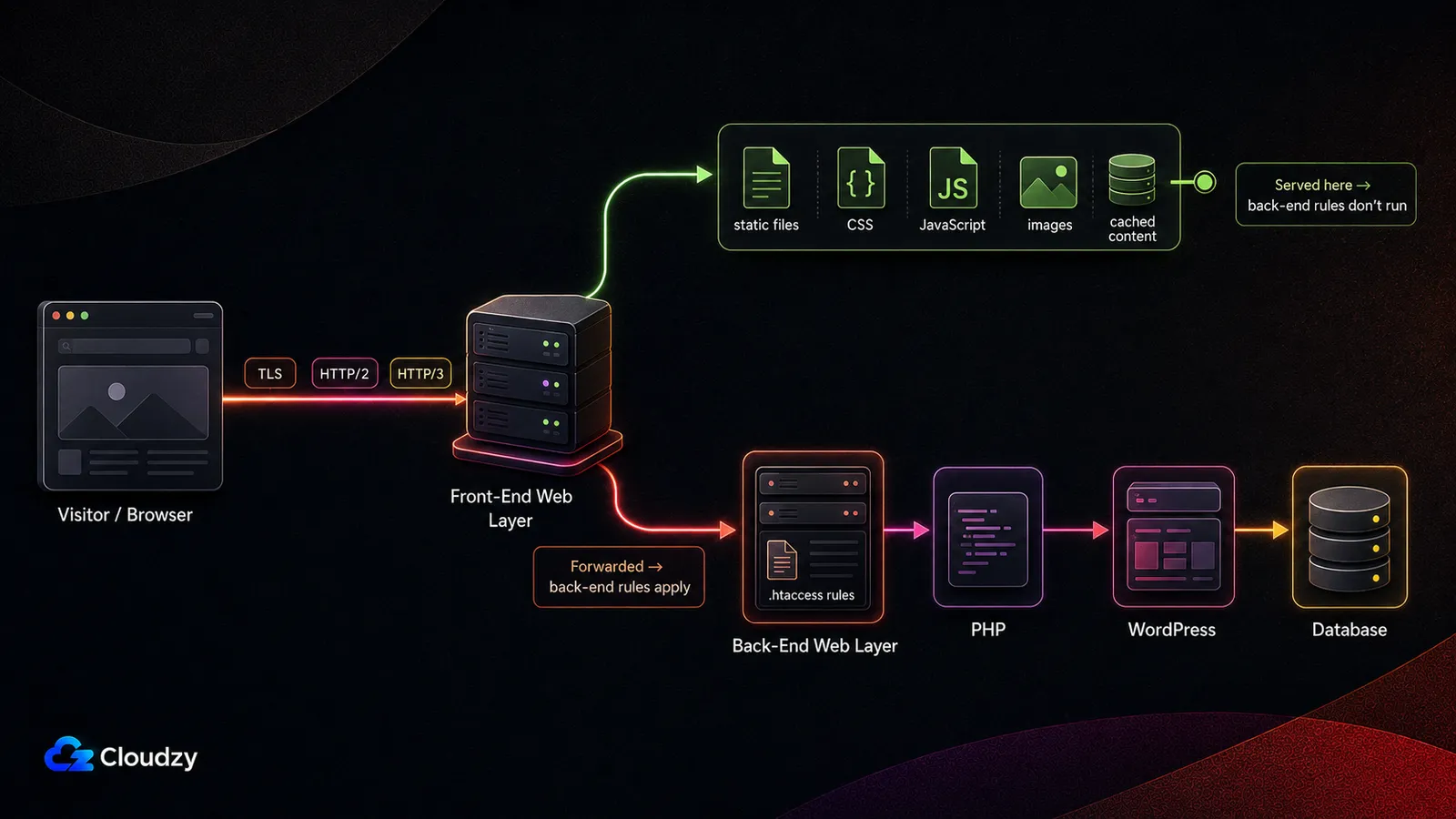
Yes, you can run both. A common hybrid layout puts NGINX in front as the client-facing reverse proxy and Apache behind it. NGINX can terminate TLS and HTTP/2, and it can terminate HTTP/3 when its experimental HTTP/3 module is built and enabled. It can also serve selected static files itself while proxying application requests to Apache.
The important caveat is rule ownership. A request that NGINX serves directly never reaches Apache, so Apache .htaccess rules do not apply to that request. The two configurations have to agree on rewrites, caching, client IP forwarding, TLS behavior, and which server owns each path.
The cost is that you are now running two web servers. Two configurations that have to agree with each other, two update cycles to track, and a second place to look when a request returns something unexpected. On a single small site that overhead usually outweighs the benefit; it starts paying off when you want HTTP/3 or faster static delivery without giving up the .htaccess behavior your plugins depend on.
Is NGINX Easier Than Apache?
Neither server is universally easier. NGINX is simpler if you prefer one centralized configuration and are comfortable editing server blocks. Apache is easier when WordPress or third-party plugins expect .htaccess rules, because those rules can work at directory level without changing the global server configuration.
On a server you control, "easier" mostly comes down to which configuration model your stack already expects.
When to Use Apache Over NGINX?
Choose Apache when your WordPress stack depends on .htaccess, when plugins or control-panel tooling expect Apache rewrite directives, or when you need a specific Apache module. It is also reasonable to keep Apache on an existing site that already performs well; migrating web servers for a theoretical benchmark gain is rarely worth the disruption by itself.
When to Use NGINX Over Apache?
Choose NGINX when you expect many concurrent connections, want a strong static-file or reverse-proxy layer, prefer centralized configuration, or want the option to enable HTTP/3. For WordPress, the trade-off is that rewrite and plugin-specific server rules become an administrator task instead of something WordPress can write to .htaccess.
NGINX vs Apache: Best Web Server for WordPress?
Run NGINX. For a WordPress site on a server you control, it is the better default: low connection overhead under high concurrency, efficient static-file delivery, and HTTP/3 available if you want it.
The exception is .htaccess, and it matters. WordPress can write Apache rewrite rules when .htaccess is enabled, but it cannot modify NGINX server configuration. If a plugin expects rewrite, security, or caching directives, you need its NGINX instructions or an equivalent server-block rule and then reload NGINX. If you do not want that operational responsibility, Apache is the easier WordPress choice. On a normal-traffic site, PHP, database, and caching behavior are more likely to limit performance than the web server itself.
One assumption sits under all of this: the server has to be yours to change. On managed WordPress hosting the web server is the host's decision, and the answer to this question is whatever they already run. This comparison is for someone with root access on their own machine.

Launch a faster WordPress VPS with instant deployment.
Get WordPress VPSHow to Check if You Are Running Apache or NGINX?
If this is your own VPS, check the running services directly:
systemctl status nginx
systemctl status apache2   # Debian/Ubuntu
systemctl status httpd     # RHEL/Fedora-family systems
For a remote website you do not control, the HTTP Server response header can be a clue, but it is not definitive. A reverse proxy or CDN may expose its own server software instead of the origin, and the header can also be hidden or changed.
Hosting Apache or NGINX on a VPS
If you control the VPS, both servers are straightforward to run. Size the machine for the whole WordPress stack rather than Apache or NGINX alone: PHP workers, the database, caching, traffic, and background jobs usually consume more resources than the web server itself.
Whichever server you choose, you are responsible for configuration, updates, TLS, backups, and monitoring. Running both adds a second configuration and update path, so use the hybrid setup only when you have a specific reason for it.
Cloudzy's NGINX VPS is a self-managed Linux VPS with full root access, so the server configuration stays yours.
The Apache HTTP Server image in our marketplace installs the same way, in one click, so standing up either server, or both, does not start with compiling from source.
Frequently Asked Questions
Is Apache Better Than NGINX?
Neither is universally better. NGINX is usually the stronger default when you care about high concurrency, static-file delivery, reverse proxying, or HTTP/3. Apache is usually easier when your WordPress stack depends on .htaccess or Apache-specific modules.
Why Is NGINX Faster Than Apache?
NGINX can handle many connections inside each worker's event loop, which keeps per-connection overhead low under high concurrency. Apache's event MPM also handles connections asynchronously, so the gap is smaller than older prefork comparisons suggest. On WordPress, PHP, database queries, and caching can matter more than the web-server difference.
Should I Use Apache or NGINX for WordPress?
For a self-managed WordPress VPS, NGINX is a strong default if you are comfortable managing server-block rules yourself. Choose Apache if you rely on .htaccess or plugins that expect Apache rewrite rules and want those rules to work with less manual server configuration.
Why Is NGINX So Popular?
NGINX combines efficient high-concurrency request handling with reverse proxying, load balancing, caching, FastCGI support, and TLS termination. That makes it useful both as a primary web server and as a front-end proxy.
Why Is Apache Still Used?
Apache remains widely used because of its module ecosystem, .htaccess support, mature tooling, broad platform support, and compatibility with hosting and control-panel workflows built around it.
What Is the Difference Between Apache and apache2?
On Debian and Ubuntu, apache2 is the package and service name for Apache HTTP Server. RHEL and Fedora-family systems typically call the service httpd. They are not separate web servers; both refer to Apache HTTP Server. The current stable Apache branch is 2.4, with 2.4.68 as the latest release.
Does Apache Support HTTP/3?
Not natively. Apache HTTP Server 2.4 does not ship with an HTTP/3 or QUIC module; its bundled protocol support stops at HTTP/2. If you need HTTP/3 in production, you can terminate it in an HTTP/3-capable reverse proxy or CDN in front of Apache.


Discussion
Comments
Sign in to join the discussion.